Settings
Monitor is a managed service: 2N5 adds your circuits, sets up the tests and runs the test calls. You adjust what belongs to your organization, such as who gets told, your reports and the defaults on the Settings screen, and ask 2N5 for the rest.
Download the documentation (PDF)The Settings screen
- In the sidebar, click Settings.
- In Settings for, choose the whole organization or one entity. An entity can have values of its own, different from the organization’s.
- Choose a tab: Voice circuits, Data circuits, Online services, Quality thresholds, Reports & clock or Contracts.
- Change the values. The What this adds up to box shows the effect straight away, such as how many calls a day and how long from the first failure to a confirmed outage.
- Click Save changes, or Discard to drop them.
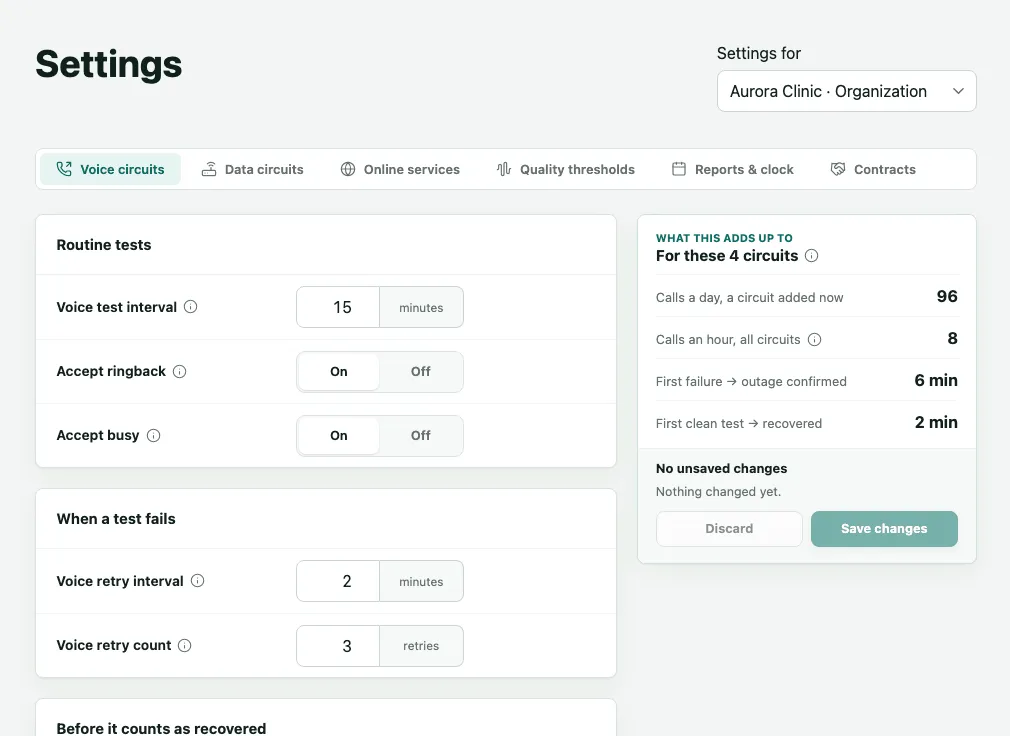
What each tab holds:
- Voice circuits: the interval between tests, whether ringing out unanswered or a busy signal count as the circuit working, the interval and number of retries before an outage is confirmed, and how many clean tests confirm recovery.
- Data circuits and Online services: the defaults for links, websites and mailboxes.
- Quality thresholds: the measured MOS-LQO scores below which a call counts as degraded and from which it counts as fully healthy.
- Reports & clock: the organization’s time zone, used on every screen, alert and report, and the reports’ availability target.
- Contracts: the providers’ contract terms, which the report compares with what was delivered.
Each circuit keeps the values it was added with: a change here applies to circuits added afterwards.
What you change
| Where | What |
|---|---|
| Account settings | Password, two-step verification, signing out of all devices and deleting your account. |
| Sidebar and account menu | Language and theme. |
| Escalation | Who gets told, in what order, at which addresses, and each layer’s Timings. |
| Entities and Managers | The organization’s structure and who manages it. |
| A circuit’s page | Planned maintenance windows. |
| Reports | Generating, sending and scheduling the monthly delivery. |
| A content incident’s page | This change is expected. |
| Settings | The defaults your account may change. |
What only 2N5 changes
Ask 2N5 to:
- Add a kind of item to your package, or raise the limit of circuits, websites or mailboxes.
- Add a new circuit and run its verification call, or change an existing circuit’s number, test interval or retries.
- Set up or replace the reference recording of a circuit answered by a recorded message.
- Change how often a data circuit is measured and its speed tested, and the limits that make a link count as degraded or down.
- Change how often a website or mailbox is checked and when it counts as down, and what a website’s page must show.
- Install the agent, or set up a check from outside, for a data circuit.
- Send a new link to connect a mailbox.
When a screen says a value is set by 2N5, or that a problem is on 2N5’s side, there is nothing for you to do: 2N5 has already been alerted. The chapter FAQ and help says how to reach 2N5.
Frequently asked questions
I changed a value in Settings. Why did an older circuit not change?
Each circuit keeps the values it was added with. The values on the Settings screen are the organization's or the entity's defaults, and they apply to circuits added after the change. To change the test interval, the retries or the recovery of a circuit that already exists, ask 2N5.
How do I raise the number of circuits I can monitor?
Your organization's package sets how many voice circuits, data circuits, websites and mailboxes it can have. The Add asset window shows how much of each is already in use. To add a kind that is not in your package or to raise a limit, talk to 2N5.
Can I add a circuit myself?
The Add asset button at the top of the screen opens the choice of voice circuit, data circuit, website and email, within your package's limits. In practice, 2N5 usually adds and verifies circuits for you, because every new circuit goes through a real verification call and depends on 2N5's calling account.