FAQ and help
This chapter gathers the questions customers ask most day to day and says where to find help. Inside Monitor, the help button opens a guided walkthrough; outside it, the 2N5 team helps you through the channel agreed when you signed up.
Download the documentation (PDF)The guided walkthrough
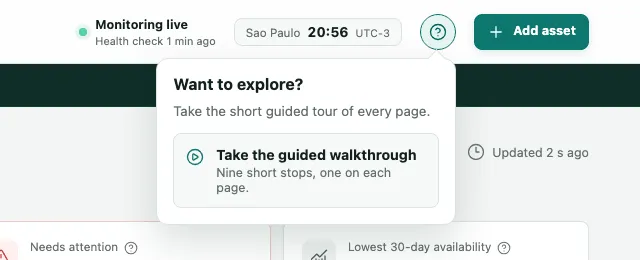
Monitor has a walkthrough that stops once on each page and explains what it shows.
- At the top of the screen, click the ? button (Help and walkthrough).
- Click Take the guided walkthrough. It is nine short stops, one on each page.
Help is also on the screens themselves: the i icon next to a heading explains what the box shows and how its figure is calculated.
How to ask 2N5 for help
Monitor is a managed service, and 2N5 looks after your circuits together with you.
- Before you write, note the incident’s number, such as INC-0004, or the circuit’s name, and what you saw on the screen.
- Contact your 2N5 representative through the channel agreed when you signed up.
- For an incident with your provider, copy the Provider-ready evidence block from the incident’s page and send it with the ticket.
Requests about personal data, such as access, correction or deletion, go to privacidade@2n5.com.br. Security and LGPD explains how data is handled.
Further reading
- The glossary explains the terms that appear on the screens, such as MOS-LQO, jitter and maintenance window.
- The Docs gather this guide, the product pages and the reference for SIP codes and Q.850 causes, which appear in the observation log.
Frequently asked questions
Does Monitor call my numbers all the time? Does that get in the way?
Monitor makes one short test call to each circuit at the agreed interval, for example every 15 or 30 minutes, and repeats it only when a test fails. Whoever answers hears that it is an automatic test and the call ends. The hourly call budget on the dashboard shows how much of this hour's capacity has been used.
Why did Monitor not alert me on the first failure?
Because a single failure never becomes an alert. Monitor repeats the test and opens an incident only after four failed tests in a row, the first one and three retries, usually within a few minutes. That way you get no false alarm for a few seconds of trouble, and when an alert arrives the failure is real.
Where do the times on the screens and in the alerts come from?
Every time on the screens, in the alerts and in the reports uses your organization's time zone, shown at the top of the screen next to the clock, such as São Paulo, UTC-3. It is under Settings, on the Reports & clock tab. Your computer's own clock does not change what Monitor shows.
How long is call and contact data kept?
Each kind of data has a retention period and is deleted when it ends. A call's audio is kept only when the call is answered by a recording, never by a person. The periods and your rights are in the Privacy Policy; requests about personal data go to privacidade@2n5.com.br.
Can I use Monitor on my phone?
Yes. The screens fit a phone, with the sidebar opened from the button at the top. Day to day on a phone, the usual thing is to receive the alert by email and tap the link to acknowledge the incident, without signing in. The full dashboard is more comfortable on a bigger screen.