Incidents and alerts
An incident is a confirmed failure: it opens only after four failed tests in a row, the first one and three retries. Monitor then alerts the people on your escalation ladder, layer by layer, until somebody acknowledges the incident from the link in the message.
Download the documentation (PDF)How a failure becomes an incident
- A test call fails. The circuit becomes Suspect and nobody is told yet.
- Monitor repeats the test, usually every 2 minutes.
- If the first test and its three retries fail, that is four failed tests in a row, the failure is confirmed: the circuit becomes Down or Degraded and an incident opens.
- The first layer of the escalation ladder is alerted.
- Once the circuit passes two clean tests in a row, the incident closes as recovered and everybody who was alerted gets the message that it is back.
The incident list
- In the sidebar, click Incidents.
- Use the All, Open, Not acknowledged and Resolved tabs, or Filter.
- Click View to open an incident.
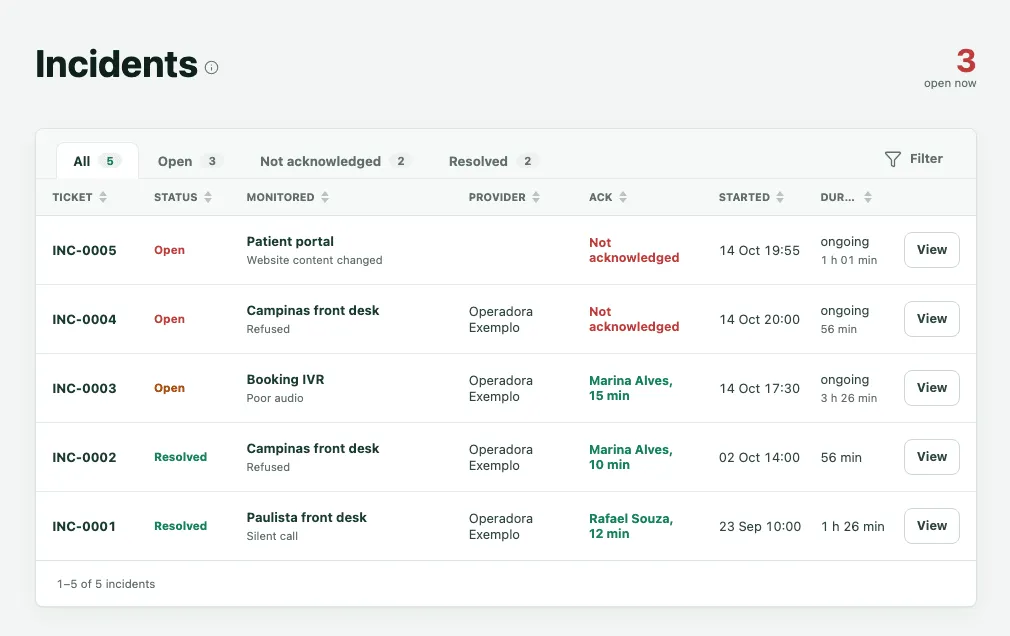
Every incident has a number, such as INC-0004. The Ack column shows who acknowledged it and how quickly, or Not acknowledged.
An incident’s page
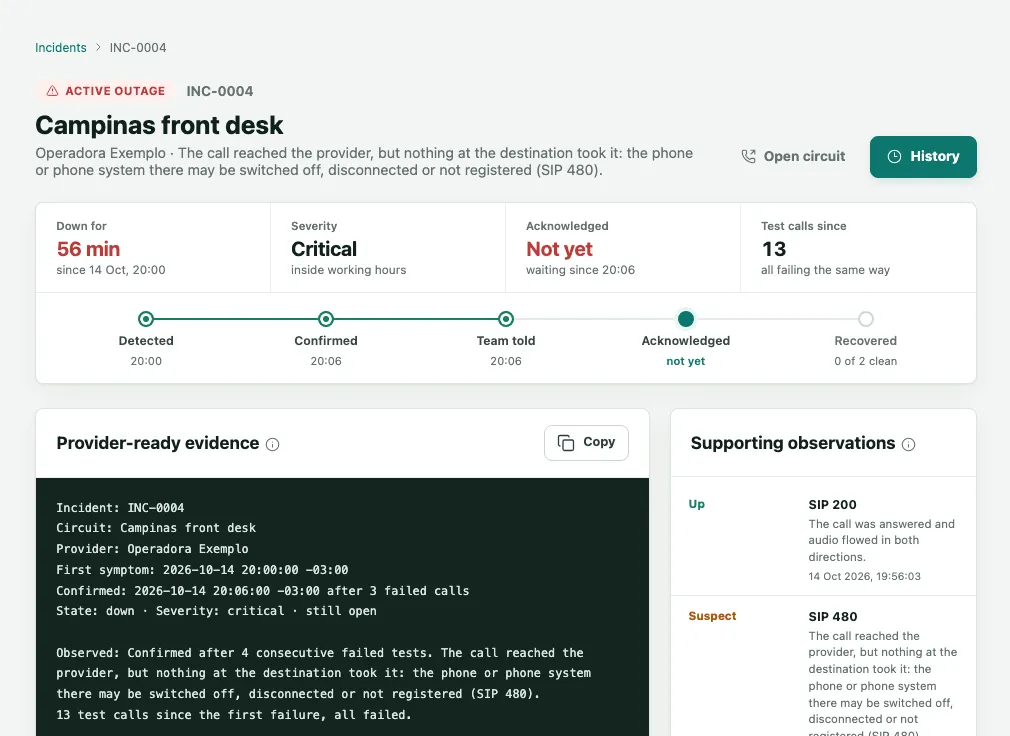
- At the top, the circuit, its provider and the symptom, with Open circuit and History, which shows every message sent about the incident and to whom.
- Down for, Severity, Acknowledged and Test calls since. The severity is Critical when the incident opened inside the organization’s working hours, and Minor when it opened outside them.
- Where it stands shows the timeline: Detected, Confirmed, Team told, Acknowledged and Recovered.
- Provider-ready evidence is a block of text with the circuit, the provider, the first symptom, the confirmation and the test calls. Click Copy and paste it into the provider’s ticket, without rewriting it.
- Supporting observations lists the test calls from the incident’s own time.
The escalation ladder: who gets told
- In the sidebar, click Escalation. The Who gets told page shows The ladder.
- Each layer has a name and its people. A confirmed failure goes to layer 1 first. If nobody acknowledges, the alert is repeated and then climbs to the next layer.
- To see or change how long each layer waits and how many times it repeats the alert before climbing, click Timings.
- To add somebody, use Add someone on the layer, or Add contact at the top, and enter their name, role, language and addresses: email and mobile.
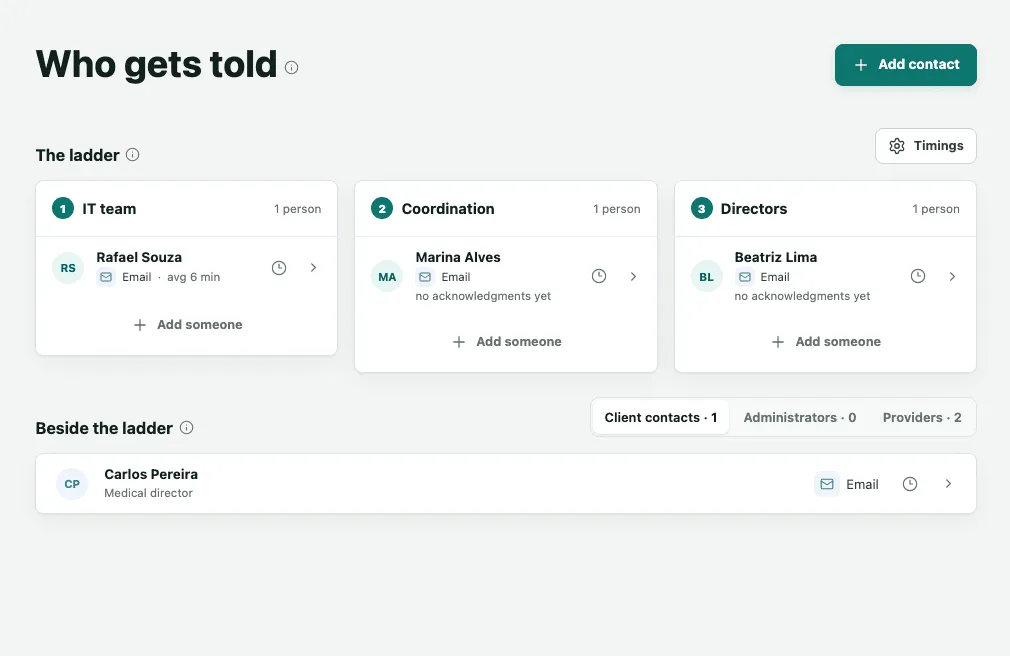
Beside the ladder holds the Client contacts: people who get the message that a circuit is down and being handled, and the message that it is back, without having to acknowledge anything. If no layer acknowledges an incident, 2N5 is alerted to act.
Acknowledging from an email link
Every alert from the ladder carries a link to acknowledge the incident. Acknowledging means: I have it, you can stop alerting.
- Tap the link in the message. The page opens on your phone or computer, without signing in to Monitor.
- Tap Acknowledge incident.
- The page confirms it: the incident is acknowledged and no further alerts will be sent for it.
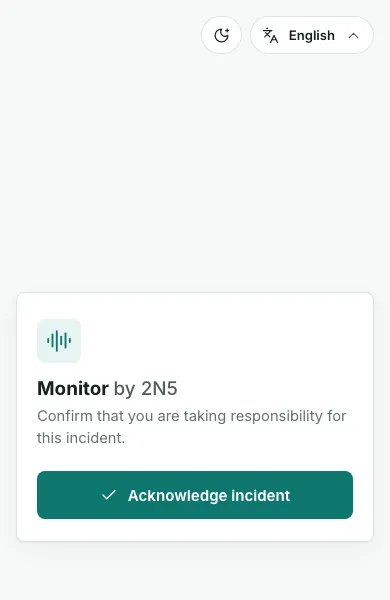
If somebody else already acknowledged it, the page says who and that nothing more is needed. If the circuit had already recovered, the page says so and records your response.
What each message means
Alerts arrive by email. The examples below use the circuits of this guide’s fictitious clinic.
The outage is confirmed
Alert for Aurora Clinic: circuit Campinas front desk is DOWN since 10/14 19:36. Acknowledge at …/a/… to stop further alerts.
It goes to the ladder’s first layer. Tap the link and acknowledge; then check the circuit or open a ticket with the provider.
Nobody has acknowledged yet
Alert for Aurora Clinic: Campinas front desk still DOWN since 10/14 19:36, not yet acknowledged. Acknowledge at …/a/… to stop alerts.
It goes to the next layer, when nobody acknowledged in time. Acknowledge from the link if you are taking it.
An update for the client
Update for Aurora Clinic: Campinas front desk is down since 10/14 19:36. We are working on it and will tell you when it is back.
It goes to the client contacts. There is nothing to do; it is for information.
The circuit is back
Update for Aurora Clinic: Campinas front desk is back UP at 10/14 20:42 after 1 h 6 min down. No action needed.
It goes to everybody who was told about the outage. The incident is closed.
The emails
By email, the subject says what it is about in a plain sentence, the same one the email opens with: Main line is down for an outage, Main line has poor call quality when calls connect but sound bad, and Main line is working normally again when it is back. Each email ends by saying why you receive it and who to ask to stop it. The email gives the problem in plain words, when it started, when it was confirmed and, for people on the ladder, the Acknowledge link. Data circuits, websites and mailboxes follow the same pattern, with the circuit’s or the service’s name in the message.
Frequently asked questions
Why did I get an alert when the circuit was already back?
The alert goes out the moment the failure is confirmed. If the circuit comes back soon after, you also get the message saying it is working again. Opening the link of an alert that is already resolved shows that the circuit had recovered and records your response; no new alert is sent about that incident.
Do I need to acknowledge an incident somebody else already acknowledged?
No. One person acknowledging is enough to stop the alerts for everyone. If you open the link afterwards, the page shows who acknowledged it first and says nothing more is needed from you. Who acknowledged and how long it took stay on the incident and go into your reports.
Through which channels do I get alerts?
Monitor alerts by email. Each contact can have more than one address, and the order they are used in is set on the contact.